Chapter 3: Digital Twin & Simulation
Overview
This chapter explores the concepts of digital twins and simulation environments, which are crucial for developing and testing robotic systems.
Objectives
- Understand the concept of a digital twin.
- Learn about popular simulation environments like Gazebo and Unity.
- Understand how to set up a basic simulation.
Core Content
A digital twin is a virtual representation of a physical object or system. In robotics, a digital twin is a detailed simulation of a robot and its environment, which can be used for development, testing, and validation before deploying to a physical robot. Simulation environments like Gazebo and Unity are commonly used to create these digital twins.
Setting up a basic simulation with Gazebo
Gazebo is a popular open-source robotics simulator. To set up a basic simulation, you would typically define your robot and its environment in SDF (Simulation Description Format) or URDF (Unified Robot Description Format) files.
Examples
A simple robot in SDF
<?xml version='1.0'?>
<sdf version='1.6'>
  <model name='simple_robot'>
    <pose>0 0 0.5 0 0 0</pose>
    <link name='chassis'>
      <collision name='collision'>
        <geometry>
          <box>
            <size>0.4 0.2 0.1</size>
          </box>
        </geometry>
      </collision>
      <visual name='visual'>
        <geometry>
          <box>
            <size>0.4 0.2 0.1</size>
          </box>
        </geometry>
      </visual>
    </link>
  </model>
</sdf>
Controlling the robot with a ROS 2 node
You can then use a ROS 2 node to control the robot in the simulation. For example, you could publish velocity commands to a topic that the simulated robot subscribes to.
Figures
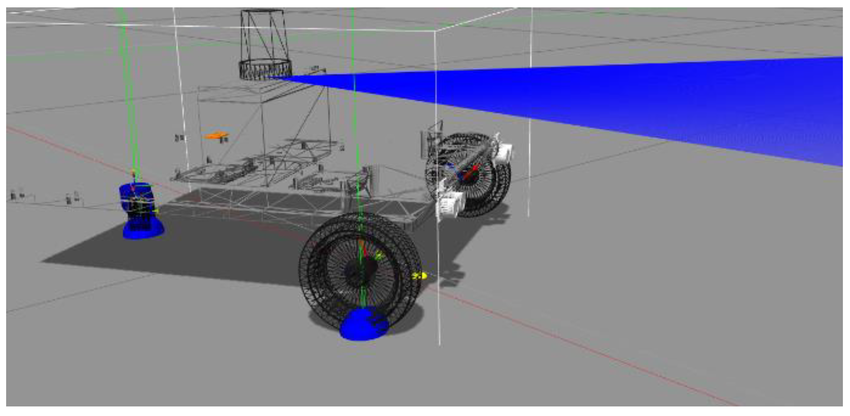
Figure 1: A simple robot model in the Gazebo simulation environment.
Summary
This chapter introduced the concept of digital twins and showed how to set up a basic simulation using Gazebo and SDF. We also discussed how to control a simulated robot using ROS 2. In the next chapter, we will explore the more advanced capabilities of NVIDIA Isaac Sim.